Encrypted Token: What It Is and Why It Matters
Encrypted Token: What It Is and Why It Matters
If you build or operate modern software, you probably use tokens everywhere: API keys, OAuth access tokens, session tokens, webhook secrets, service credentials, and more. The problem is that many teams still treat these values like plain text secrets, which creates unnecessary risk in logs, browsers, CI pipelines, automation tools, and internal systems.
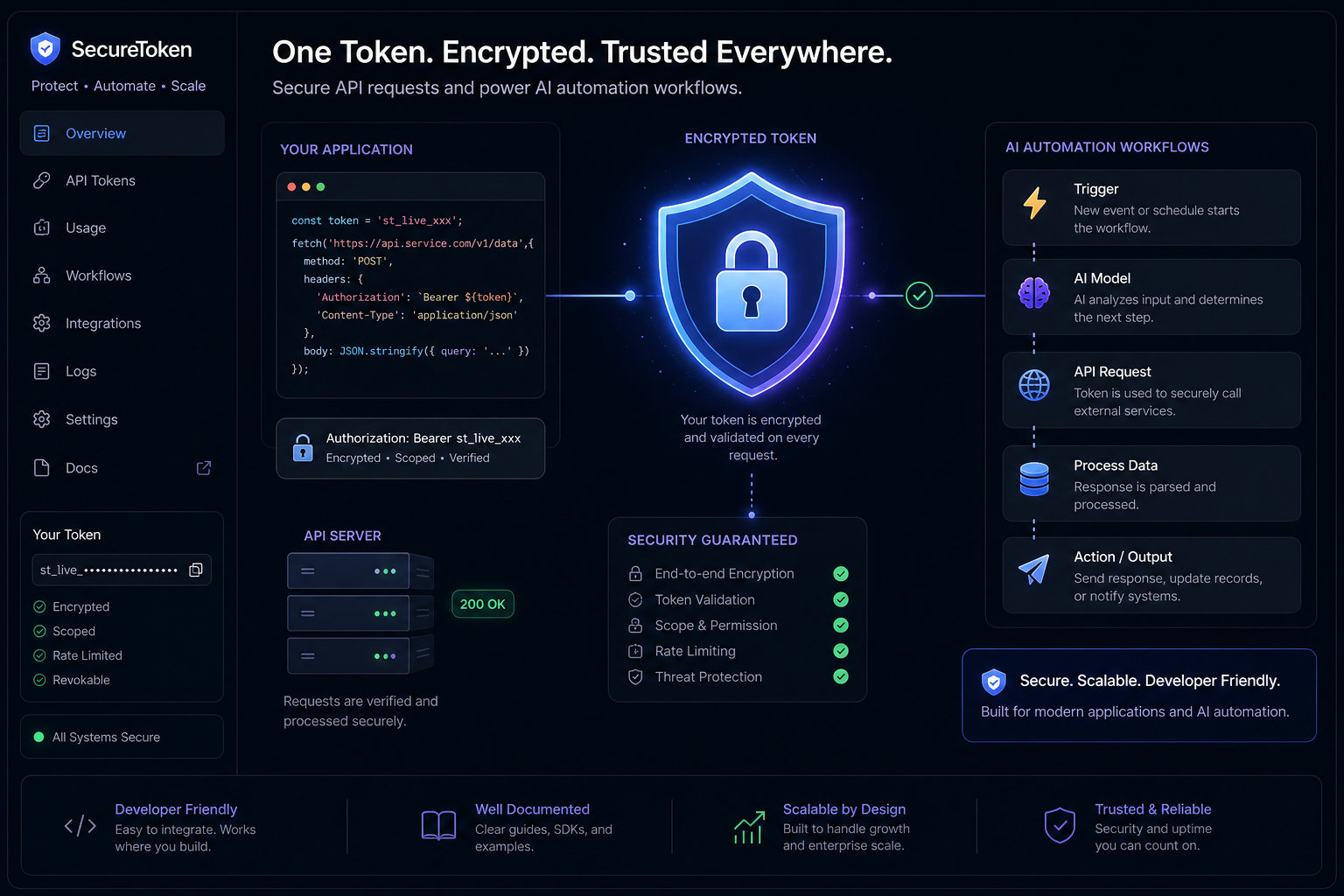
An encrypted token adds a critical layer of protection. Instead of exposing usable credentials in readable form, it stores or transmits token data in encrypted form so that only authorized systems with the right keys can decrypt and use it. For developers, DevOps teams, startup operators, and AI automation builders, that matters because tokens are often the real keys to your infrastructure, data, and workflows.
For recurring AI automations in particular, the stakes are even higher. Scheduled jobs may need access to GitHub, Datadog, Linear, Slack, internal APIs, or cloud services. If those tokens leak, the automation becomes an attack path. That is why secure secret handling, isolation, and controlled token use should be part of the automation platform itself - not an afterthought you bolt on later.
What Is an Encrypted Token?
An encrypted token is a token whose contents are protected with cryptography so that unauthorized users cannot read or misuse the underlying data.
Depending on the system, “encrypted token” can mean a few different things:
- A token value that is encrypted at rest in a database or secrets store
- A token that is encrypted in transit between systems
- A structured token, such as a JWT, that is wrapped in JWE (JSON Web Encryption)
- A tokenized value that is itself encrypted for extra protection
- A secret or credential that is only decrypted just-in-time at execution time
The core idea is simple: if someone intercepts or accesses the token without authorization, they should not be able to use it as-is.
Plain-English Example
Imagine a scheduled AI job that checks GitHub issues every morning and sends a summary to your team. That workflow needs a GitHub token.
There are two ways to handle it:
Approach | What happens | Risk level |
|---|---|---|
Plain-text storage | Token is stored directly in config, env vars, or job settings | High |
Encrypted token storage | Token is encrypted in storage and only decrypted during secure execution | Lower |
In the second case, even if someone gains read access to the storage layer, exported configs, or some logs, the token is far less likely to be immediately usable.
Why Encrypted Tokens Matter
Tokens are often more dangerous than passwords because they are:
- Frequently long-lived
- Easy to copy
- Used machine-to-machine without human review
- Embedded into automation, scripts, CI/CD, and integrations
- Sometimes overprivileged
That makes them prime targets.
An encrypted token helps reduce risk in several ways:
1. It Reduces Blast Radius
If a database dump, misconfigured dashboard, or debug output leaks, encrypted values are much less useful to an attacker than plain text ones.
2. It Improves Secret Hygiene
Teams are less likely to casually reuse, expose, or mishandle secrets when the platform enforces encrypted storage and controlled injection.
3. It Supports Compliance and Auditability
Encryption and token protection help align with common security expectations across PCI, HIPAA, SOC 2, internal security reviews, and vendor due diligence.
4. It Fits Real Automation Workloads
Recurring AI workflows often need access to third-party services. Those workflows should run without requiring teams to manage raw credentials in scripts or custom infrastructure.
"The total number of tokenized payment transactions was projected to exceed 1 trillion globally by 2026." - Business Wire / Juniper Research
That statistic comes from payments, but the takeaway is broader: token-based security is not niche anymore. It is a default design pattern in modern digital systems.
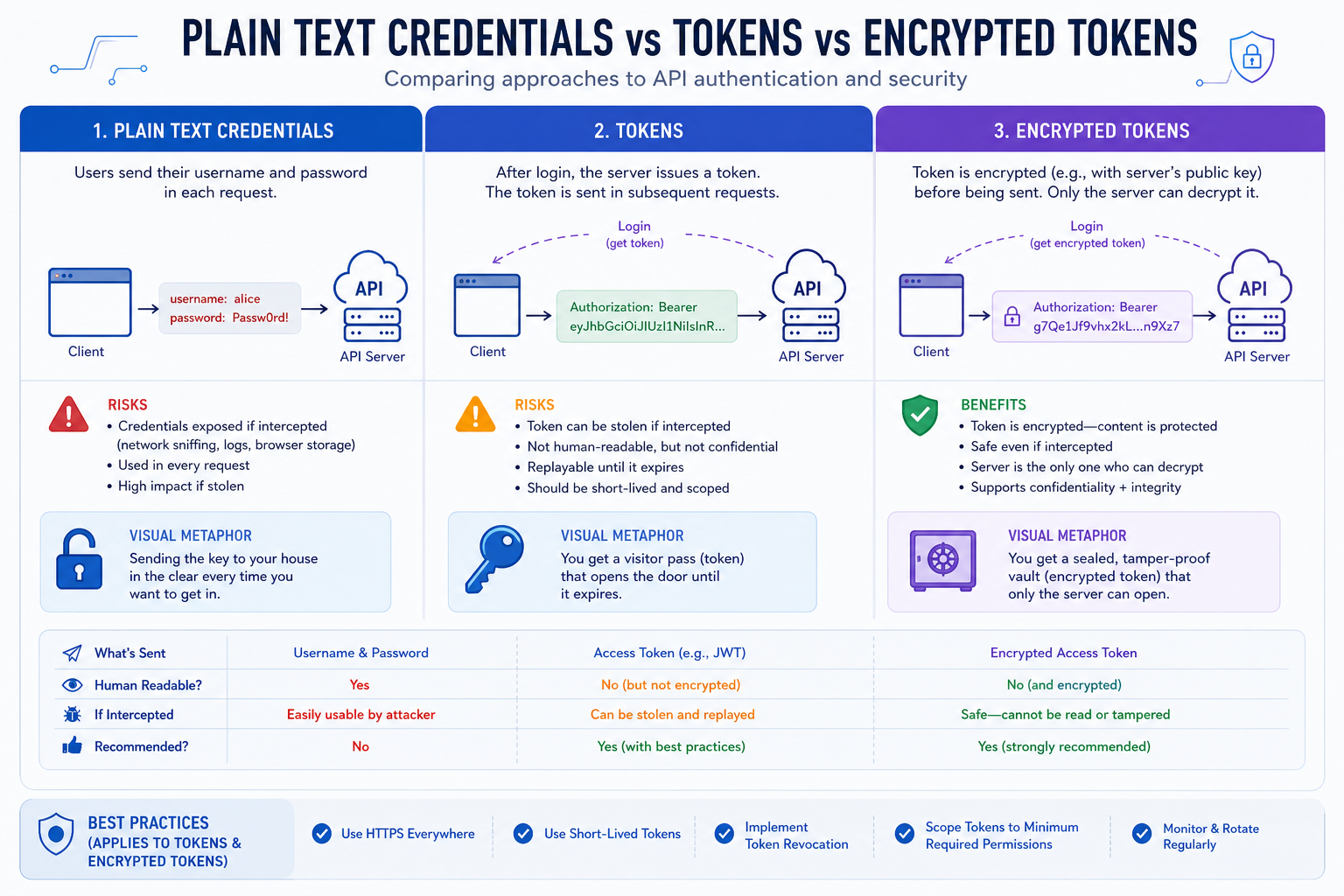
Encrypted Token vs Plain-Text Credential
This is the comparison most readers actually care about.
Plain-Text Credential
A plain-text credential is stored exactly as entered. If someone sees it, they can likely use it immediately.
Examples:
ghp_xxx...in a YAML file- API key in a
.envfile - Bearer token logged in debug output
- Secret pasted into a no-code tool field with no encryption
Encrypted Token
An encrypted token is protected cryptographically so the stored or transmitted value is unreadable without the right decryption mechanism.
Examples:
- API token encrypted in a secrets vault
- JWE-encrypted identity token
- Credential injected only at runtime inside an isolated execution environment
- Token encrypted before being stored in an automation platform
Comparison Table
Feature | Plain-text credential | Encrypted token |
|---|---|---|
Readable if exposed | Yes | No, not without decryption |
Safe in logs/exported configs | No | Safer, though still should be controlled |
Storage security | Weak | Stronger |
Runtime handling | Often ad hoc | Usually controlled |
Compliance posture | Poorer | Better |
Operational discipline | Manual | More enforceable |
Encrypted Token vs Tokenization vs Hashing
Many articles blur these concepts. They are related, but not interchangeable.
Encryption
Encryption transforms readable data into ciphertext using a key. Authorized parties can decrypt it.
Best for:
- Data that must later be used or read
- Secrets at rest
- Secure transport
- Protecting token payloads
Tokenization
Tokenization replaces sensitive data with a surrogate token that has no intrinsic meaning outside a controlled mapping system.
Best for:
- Payment data
- Reducing PCI scope
- Systems that need references, not original data
Hashing
Hashing is a one-way transformation. It is not designed to be reversed.
Best for:
- Password verification
- Integrity checks
- Fingerprinting
Quick Comparison
Method | Reversible? | Primary use |
|---|---|---|
Encryption | Yes, with key | Confidentiality |
Tokenization | Only via token vault or mapping system | Data substitution |
Hashing | No | Verification and integrity |
A practical takeaway: if your automation needs to use a credential later, hashing will not help. You generally need either encrypted storage or a tokenization system with secure retrieval rules.
Where Encrypted Tokens Are Used
Encrypted tokens show up in more places than most teams realize.
OAuth and OpenID Connect
In identity systems, tokens may be signed, encrypted, or both. An ID token, for example, can be encrypted with JWE to prevent exposing personally identifiable information to clients or logs.
"In FAPI 1.0, it is recommended that ID tokens transmitted via the front channel be encrypted to prevent exposure of PII to browsers or server logs." - Curity
This matters because many teams assume signed tokens are automatically private. They are not. A signed JWT is tamper-evident, but its claims may still be readable unless it is also encrypted.
Payment Systems
Payment platforms use tokenization extensively, and some workflows also encrypt tokenized data for layered security. This helps reduce exposure of PANs, improve compliance posture, and limit breach impact.
API Gateways and Service-to-Service Auth
Internal systems often exchange short-lived access tokens, client assertions, or opaque tokens. Encrypting or securely storing these tokens reduces operational risk, especially in distributed environments.
Automation Platforms
Any platform that runs scheduled jobs, LLM workflows, reports, security checks, or integrations needs secure token handling.
That includes:
- GitHub access tokens
- Monitoring platform API keys
- Project management API credentials
- Cloud provider tokens
- Internal service credentials
- Webhook signing secrets
This is where product design matters. If an automation platform expects users to manually manage raw secrets across configs, scripts, and deployment layers, security degrades fast.
How Encrypted Tokens Work
The details vary by implementation, but the lifecycle usually looks like this:
1. Token Is Created or Imported
A user or system provides a token such as:
- API key
- OAuth access token
- Refresh token
- Service account secret
- Session or identity token
2. Token Is Encrypted Before Storage
The platform encrypts the token before persisting it. That might use:
- Application-level encryption
- KMS-backed encryption
- Envelope encryption
- Vault-managed encryption
- JWE for structured token payloads
3. Access Is Controlled
Only authorized services or execution contexts can request decryption. Good systems enforce role-based access, audit logs, and runtime scoping.
4. Token Is Decrypted Only When Needed
Instead of exposing the value widely, the platform decrypts it just-in-time for the specific task or runtime that needs it.
5. Execution Happens in a Controlled Environment
This is a major gap in many competitor articles: encryption alone is not enough. If the decrypted token lands in an unsafe environment, you still have a problem.
A strong design also includes:
- Isolated execution
- Minimal secret exposure
- No persistent raw token storage in user-controlled runtime
- Transparent logs without leaking secrets
The Security Benefits Developers Actually Care About
Developers and operators usually do not want abstract theory. They want to know what problems this solves in the real world.
Safer Scheduled Automation
If you run recurring prompt-based jobs, summaries, checks, or alerts, you need secrets for external systems. Encrypted tokens reduce the chance that those credentials leak through:
- Job definitions
- Environment configs
- Team handoffs
- Internal admin panels
- Execution logs
Lower Risk During Debugging
A common failure mode is accidental exposure during troubleshooting. Teams dump config, inspect variables, or share screenshots. Encrypted storage helps reduce what is visible by default.
Better Multi-User Team Safety
In startup teams and fast-moving ops environments, many people touch tooling. Encrypted token handling reduces the number of people and systems that ever see raw credential values.
Cleaner Architecture
Instead of building your own secrets pipeline, storage layer, scheduler, sandbox, logging, and token rotation logic, you can use a platform designed for this workflow.
That is one reason runprompt is compelling for practical AI automations. It gives teams:
- No infrastructure to manage
- No coding required for common recurring workflows
- Easy cron-based scheduling
- MCP server support to connect tools and APIs
- Encrypted secrets handling
- Sandboxed isolated execution
- Transparent logs and run history
- Multiple model tiers
- Fast setup for briefings, monitoring, reporting, and security checks
That combination matters because security is strongest when it is built into the default workflow, not left to every user to reinvent.
Common Misconceptions About Encrypted Tokens
“If It’s a JWT, It’s Already Secure”
Not necessarily. Many JWTs are only signed, not encrypted. Signing protects integrity; encryption protects confidentiality.
“TLS Is Enough”
TLS protects data in transit, but not:
- Tokens stored in databases
- Secrets in configs
- Logs
- Browser-visible payloads
- Internal tooling exposure
“We Only Use Internal Tools”
Internal leaks are still leaks. Many token compromises come from internal misconfiguration, overbroad access, or accidental exposure.
“Encryption Solves Everything”
It helps, but it is only one layer. You also need:
- Short-lived credentials where possible
- Scope limitation
- Runtime isolation
- Audit logs
- Rotation and revocation
- Safe debugging practices
Practical Use Cases
AI Briefings
A daily summary job might pull data from GitHub, Linear, Datadog, and Slack. Each connection needs tokens. Encrypting those tokens at rest and injecting them only at runtime is much safer than embedding them in custom scripts.
Monitoring and Incident Detection
An LLM-powered monitoring workflow may check dashboards, error rates, on-call incidents, and issue trackers on a schedule. These jobs often run unattended, which makes secure token handling essential.
Reporting and Internal Ops
Weekly business reports, engineering digests, support summaries, and finance snapshots often aggregate from multiple tools. Those integrations are only as secure as the secret management behind them.
Security Checks
Scheduled security or compliance checks frequently need API access to code hosting, cloud tools, SIEMs, or ticketing systems. Encrypted token storage and isolated execution reduce the risk of turning the checker into a new vulnerability.
What to Look for in a Secure Automation Platform
If your workflow depends on tokens, evaluate platforms against this checklist.
Secret Management
- Are secrets encrypted at rest?
- Are raw values ever shown again after input?
- Can secrets be scoped to specific jobs or environments?
Runtime Security
- Does execution happen in isolated environments?
- Are secrets injected only at runtime?
- Can jobs access your infrastructure directly, or are they sandboxed?
Observability Without Secret Leakage
- Are logs transparent and useful?
- Are sensitive values redacted?
- Can you inspect failures without exposing credentials?
Ease of Use
- Can non-specialists safely set up automations?
- Is scheduling straightforward, such as cron syntax?
- Can integrations be added without custom credential plumbing?
Governance
- Is there run history?
- Can you see token usage, model usage, or costs?
- Is there an audit-friendly trail of what happened?
Why This Matters for AI Workflows Specifically
AI workflows often bridge multiple systems at once. A single scheduled prompt may:
- Read issues from GitHub
- Pull alerts from Datadog
- Query tasks in Linear
- Summarize results with an LLM
- Post output to Slack or email
That means one workflow may depend on several sensitive credentials. The more automations you add, the more your token surface area grows.
This is exactly where runprompt’s architecture aligns well with security-minded teams:
- You can build useful automations quickly without standing up your own scheduler or secret store
- MCP servers let you connect external tools and APIs in a structured way
- Secrets are handled as encrypted inputs rather than informal config values
- Jobs run in isolated sandboxed containers for safer execution
- Logs and history stay transparent for debugging and operational review
- Teams can move fast without turning every automation into a bespoke infrastructure project
For solo builders and startups, this is especially valuable. The alternative is often a mix of cron jobs, environment files, cloud functions, and copied tokens across services. That setup works until it breaks - or leaks.
Best Practices for Using Encrypted Tokens
Even with strong tooling, teams should follow a few principles.
Use Short-Lived Tokens When Possible
Encryption is important, but short-lived credentials reduce damage if compromise happens.
Limit Scope
Give each token the minimum permissions required for the task.
Rotate Regularly
Do not let important automation depend on ancient credentials that nobody remembers.
Keep Decryption Close to Execution
The fewer hops between decryption and use, the better.
Avoid Logging Secrets
Even encrypted workflows can fail if decrypted values show up in output.
Prefer Platform-Level Security Controls
A secure default beats custom discipline every time.
Final Verdict
An encrypted token is not just a technical nicety. It is a foundational control for any system that relies on machine-readable credentials, especially APIs, scheduled jobs, AI automations, and internal tooling.
If you are building recurring workflows, the question is not whether you use tokens. You already do. The real question is whether you are handling them in a way that is safe, scalable, and operationally realistic.
That is why platforms like runprompt stand out. Instead of forcing you to wire together secret storage, cron infrastructure, container isolation, model execution, integrations, and debugging on your own, runprompt gives you a simpler path: write the prompt, connect tools with MCP servers, schedule it, and run it safely. No infrastructure to manage, no code required for common use cases, encrypted secret handling, isolated execution, and clear run history make it a practical choice for teams that want secure AI automation without extra operational burden.
If you want to automate briefings, reporting, monitoring, or security checks with AI - and do it without exposing raw credentials all over your stack - runprompt is worth trying.
FAQ
What is an encrypted token?
An encrypted token is a token whose value or payload is protected with cryptography so unauthorized users cannot read or use it directly. It is commonly used to secure API credentials, identity tokens, and automation secrets at rest or in transit.
Why would my husband use end-to-end encryption?
End-to-end encryption is commonly used to keep messages private so only the sender and recipient can read them. On its own, using encryption is normal and does not indicate anything suspicious; it is simply a privacy and security feature.
What is encryption and why is it so important?
Encryption turns readable data into unreadable ciphertext that can only be accessed with the proper key. It is important because it protects sensitive information such as tokens, credentials, personal data, and API traffic from unauthorized access.
Does TDE use AES-256?
Transparent Data Encryption (TDE) often supports AES-based algorithms, and many platforms use or offer AES-256. The exact cipher depends on the database vendor and configuration, so you should verify it in your specific product documentation.
Will XRP be used to tokenize assets?
XRP and the XRP Ledger are sometimes discussed in the context of asset tokenization, but whether XRP itself will be widely used depends on regulation, adoption, and market demand. That topic is separate from encrypted tokens used in API and automation security.
How many pages are 10,000 tokens?
As a rough estimate, 10,000 tokens is often around 7,500 words, depending on formatting and content type. That usually works out to roughly 15–30 pages of single-spaced English text, though the exact count varies.